
Google AI Overviews
What an AI Overviews tracker should measure, how to track Google AI Overviews by hand for free, why one search is not enough, and what to change when your page is not cited.
Last updated October 18, 2026 · ~7 min read
The short answer: an AI Overviews tracker checks the AI summary at the top of Google results for your buyers’ questions and records whether an overview appears, whether your site is cited, whether your brand is named, and who is cited instead. Track each question daily for at least a week, open the full source list, and use the cited pages to see which facts your own pages are missing.
An AI Overviews tracker watches the AI-written summary at the top of Google results for the searches you care about. A useful one records five things for each search:
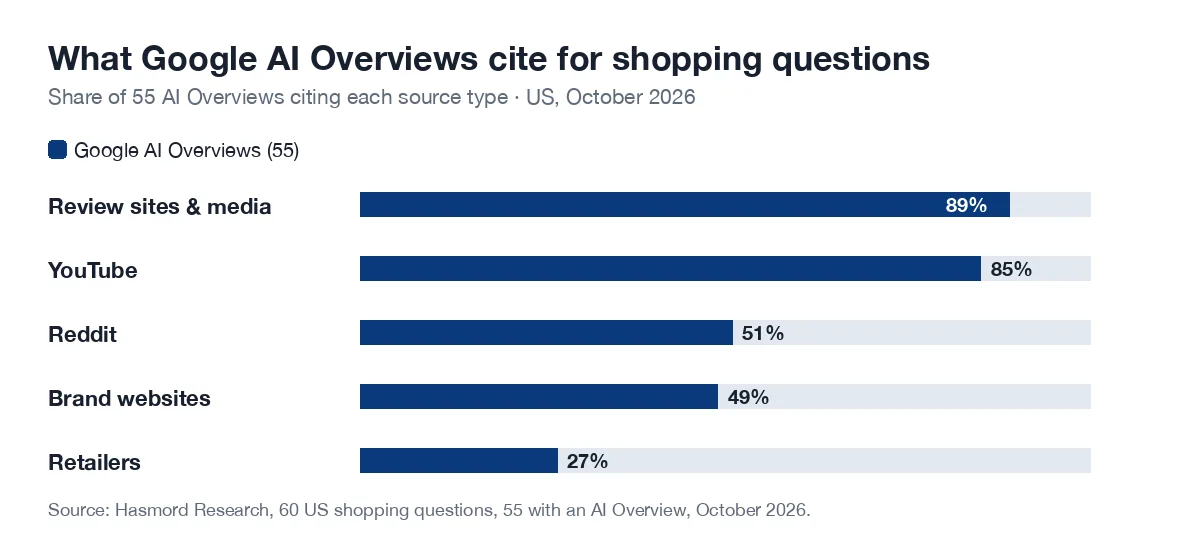
This is different from rank tracking. In our October 2026 study of 60 shopping questions, 55 showed an AI Overview, each overview cited a median of seven sites, and 64% of those citations went to sites outside the organic top 10 for that exact search. A rank tracker would not show most of them.
| Result | What it means | How to spot it |
|---|---|---|
| Cited | Your page is one of the overview’s sources | Your domain is in the linked sources, including the ones next to each paragraph |
| Mentioned | Your brand or product is named in the text | Your name appears in the summary, with or without a link |
| Recommended | The overview suggests your product for the buyer’s situation | You are named as a pick, not only listed or compared |
AI Overviews change from search to search, from day to day, and between locations, devices and people. A single check can catch an unusual day. Track the same question in the same market every day for at least a week before drawing a conclusion, and keep the days when no overview appeared: they are part of the result.
We are re-running our own 60 questions to measure how much the cited sources move week to week; the results will be on our research page.
This works for a handful of questions. Past that, or across several markets, it takes too long to do by hand every day.
Hasmord is the AEO-native sales platform. Buyers ask questions across AI assistants, search, and sales conversations. Hasmord uncovers where your answers about your products and services fall short, turns evidence into better answers, finds potential customers for you, and connects every lead to your sales process.
For the questions that matter most, Question Monitors read the question’s Google AI Overview every day for a week in the market you choose. Each day shows whether your product was recommended, mentioned or not named, which sources stayed, appeared or dropped, and which product information the answer kept weighing; days without an AI Overview are shown, not hidden. At the end of the week you get the one content change to make next.
The rest of the loop follows from there: Hasmord turns evidence into better product answers your team approves, Find customers finds people already looking for what you sell, and the CRM keeps every lead with the questions behind it, so what buyers ask in sales becomes the next question to monitor.
A seven-day series uses one research credit: 1 a month on Free, 5 on Starter, 10 on Growth and 40 on Pro (pricing).
A tool or routine that checks the AI Overview at the top of Google results for chosen searches and records whether one appears, whether your site is cited, whether your brand is named, which other sites are cited, and how that changes over time.
Pick 10 to 20 buyer questions, search them signed out with the location set to your market, open the full source list, and record whether an overview appeared, whether you were cited or named, and who was cited instead. Repeat daily for a week.
Every day for at least a week for each question you care about. Overviews change between searches and days, so a single check can be misleading.
Not necessarily. In our 60-question study, 64% of the sites cited in AI Overviews were outside the organic top 10 for that exact search. We did not check the related searches Google may run behind an overview, so this does not mean ranking is irrelevant.
Yes. The sources linked in the overview show which competitors, review sites, videos and forums were used. Record them daily to see which ones keep coming back.
Related: how to appear in Google AI Overviews · who AI Overviews cite (study) · AEO tracking · AI visibility tools · Question Monitors.