Prospecting tools
Seven sales prospecting tools compared on what they find, who they fit and what they cost, from contact databases to finding people who are already looking. Written by Hasmord, which ranks itself second.
Last updated October 21, 2026 · ~9 min read
The short answer: the best sales prospecting tool depends on the job. Apollo is the best all-in-one for outbound on a small budget; Hasmord is built for finding people who are already looking for what you sell; LinkedIn Sales Navigator leads for B2B account research; ZoomInfo for deep enterprise data and intent; Clay for custom enrichment; Lusha and Hunter for quick contact lookups. Most teams pair a database with a way to find people who are in the market now.
Who wrote this: Hasmord, one of the tools on this list. We placed Hasmord second, for the job it is built for, and we say where each of the others is the better choice. Prices and plan details are as shown on each vendor’s own site on October 21, 2026; they change, so check before you buy.
| Tool | Best for | Starts at |
|---|---|---|
| 1. Apollo.io | All-in-one outbound on a small budget | Free plan; paid plans per user |
| 2. Hasmord (Find customers) | Finding people who are already looking | Pay-as-you-go from $10 |
| 3. LinkedIn Sales Navigator | B2B account research and social selling | From $119.99/month |
| 4. ZoomInfo | Large teams that need deep data and intent signals | By quote |
| 5. Clay | Building your own enrichment workflow | Free plan; from $167/month |
| 6. Lusha | Quick contact lookups for a small team | Free plan; from $49.90/month |
| 7. Hunter.io | Finding and verifying emails by company domain | Free plan; from $49/month |
Most prospecting tools answer one of two questions, and the best setups use both.
Intent features inside databases, such as ZoomInfo’s intent topics and Hunter’s Signals, sit between the two. When you compare them, check whether a tool shows you what the person actually said, or only that their company is researching a topic.
We looked at four things: what each tool actually finds (contacts, companies or people in the market), how current that information is, what you can do with a lead once you have it, and whether the price is clear before you talk to sales. Tools that publish prices and offer a way to try them ranked higher than tools that quote only.
Best for: All-in-one outbound on a small budget.
A large B2B contact database (240M contacts and 30M companies, by Apollo’s own count) with email sequences on every account and a dialer.
Best for: Finding people who are already looking.
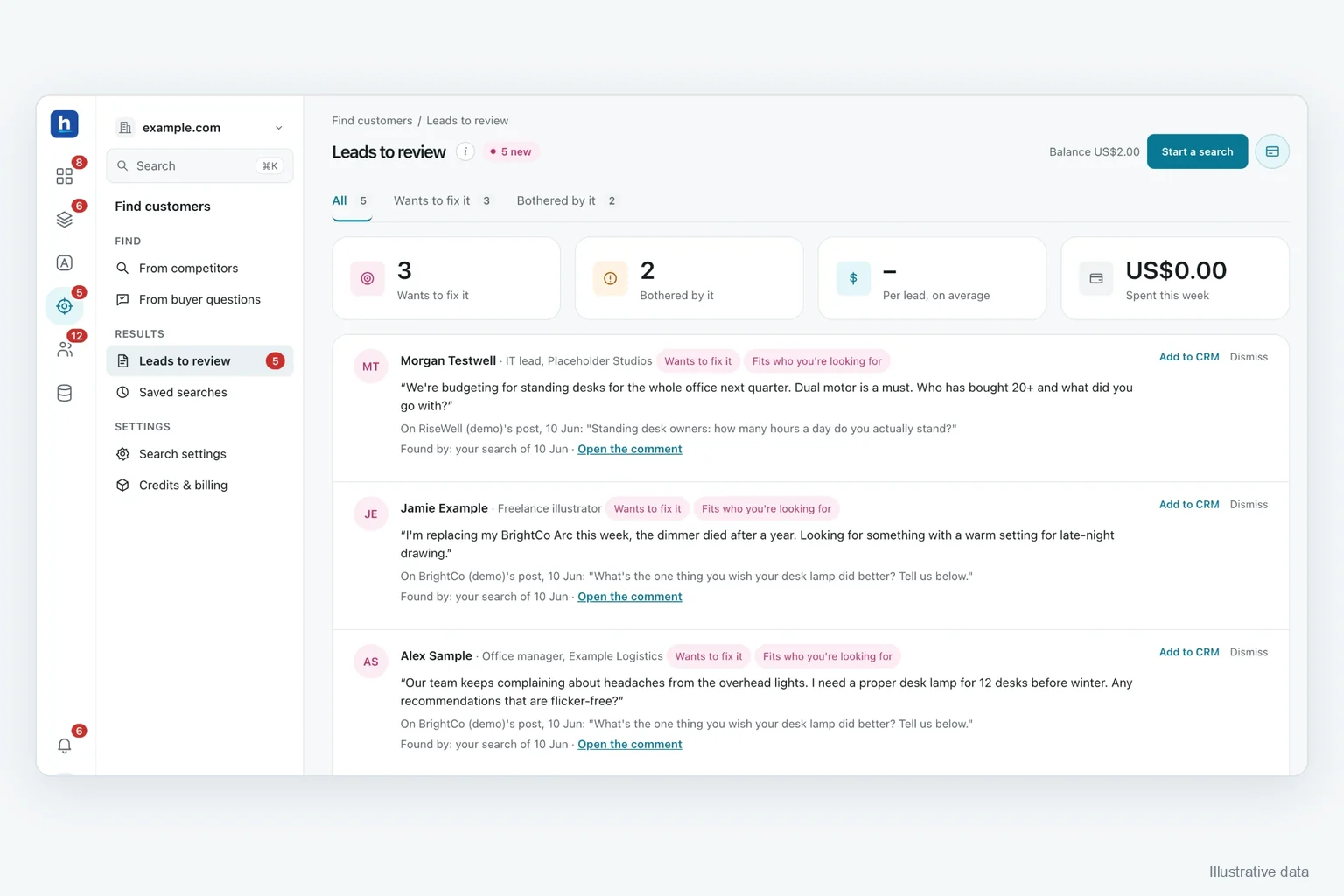
Start from what you already know: your products, the competitors you watch and the questions your buyers ask AI. Hasmord finds people showing interest in what you sell, keeps the reason each one fits, and saves them for your review. Only the people you verify join your CRM.
Best for: B2B account research and social selling.
LinkedIn’s sales product: 50+ advanced search filters on LinkedIn profiles and companies, saved accounts and leads, and InMail.
Best for: Large teams that need deep data and intent signals.
Company and contact profiles with mobile numbers and business emails, plus intent signals, buying groups and AI assistance on its Copilot plans.
Best for: Building your own enrichment workflow.
A spreadsheet-style workflow tool that enriches leads from 150+ data providers, with Claygent, an AI agent that researches custom data points on the web.
Best for: Quick contact lookups for a small team.
Verified emails and phone numbers for B2B contacts, through a browser extension and CRM integrations.
Best for: Finding and verifying emails by company domain.
Email Finder, Email Verifier and Domain Search, plus Discover (a B2B lead database), Sequences for cold email and Signals for intent data.
Hasmord is the AEO-native sales platform. Buyers ask questions across AI assistants, search, and sales conversations. Hasmord uncovers where your answers about your products and services fall short, turns evidence into better answers, finds potential customers for you, and connects every lead to your sales process.
Find customers is one of four steps in Hasmord. Hasmord uncovers where your answers about your products and services fall short in AI assistants, turns evidence into better answers your team approves, finds potential customers already looking for what you sell, and keeps every lead in an AEO-native CRM with the question that brought it. What buyers ask in sales then becomes the next gap to fix. See Find customers and pricing.
It depends on the job. For outbound volume on a budget, Apollo; for B2B account research, LinkedIn Sales Navigator; for finding people already looking for what you sell, Hasmord; for deep enterprise data and intent, ZoomInfo; for custom enrichment, Clay; for quick contact lookups, Lusha or Hunter.
Yes. Apollo has a free plan, Clay has a free plan with 100 data credits a month, Lusha includes 40 credits a month and Hunter 50 credits a month, as shown on their pricing pages on October 21, 2026. Hasmord’s Find customers is pay-as-you-go from $10.
A database tells you who fits your ideal customer and how to reach them, whether or not they are shopping. A buying signal tells you someone is showing interest now, ideally with what they said, so you can start from their need.
For B2B teams that sell through LinkedIn relationships, often yes: it gives the most current view of who works where, from $119.99 a month for Core. It shows who holds a role, not who is in the market, so many teams pair it with a database or a signal-based tool.
Partly. AI research agents can enrich and research the leads you give them, and signal-based tools can find people showing interest and explain why they fit. You still decide who is worth contacting and how.
Related: Find customers · how to find customers: 8 ways · the AEO-native CRM · from AI visibility to leads.