
CRM
What lead tracking is, the twelve fields worth tracking for every lead, a free template, how fast to reply, and how to track the leads that come from AI answers.
Last updated October 26, 2026 · ~8 min read
The short answer: lead tracking means recording every potential customer from first contact to won or lost: the source, the question they asked, one owner, a next step with a date, and the outcome. Reply fast (in a widely quoted HBR study, leads contacted within an hour were nearly 7 times as likely to qualify), and ask leads what they asked an AI assistant, because analytics shows only part of it.
Lead tracking is keeping a record of every potential customer from the moment they first reach you, or you first find them, until they buy or say no. For each lead you note where they came from, what they asked, who owns them, what happens next and how it ended.
It answers three questions every sales team has: who should we talk to today, which sources bring customers rather than just leads, and why do the lost ones get lost.
Twelve fields cover most businesses. Add your own, but keep these:
| Field | What it is for |
|---|---|
| Lead and company | Who it is, and the company they buy for. Track ownership by company, not only by person. |
| Email or phone | How to reach them. Also what you match on to catch duplicates. |
| Source | Where the lead came from: website form, call, referral, event, an AI assistant, Find customers. Keep a fixed list; “Other” tells you nothing. |
| First touch | The date they first reached you or you first found them. |
| The question they asked | In their words: what they wanted to know or fix. Most templates leave this out, and it is the most useful column you will have in six months. |
| Where they asked it | Your pricing page, a sales call, ChatGPT, a search. Ask on the form if you can. |
| Owner | One person. If two people own a lead, nobody does. |
| Stage | New, contacted, qualified, proposal, won, lost. Keep it short and defined. |
| Next step and its date | Every open lead has one. A lead with no next step is a lead you are losing. |
| Last contact | When anyone last spoke to them, so nobody writes twice in a day or not at all for a month. |
| Minutes to first reply | From first touch to your first answer. The number that most often explains a lost lead. |
| Outcome and reason lost | Won or lost, and why. Lost leads are data; don’t delete them. |
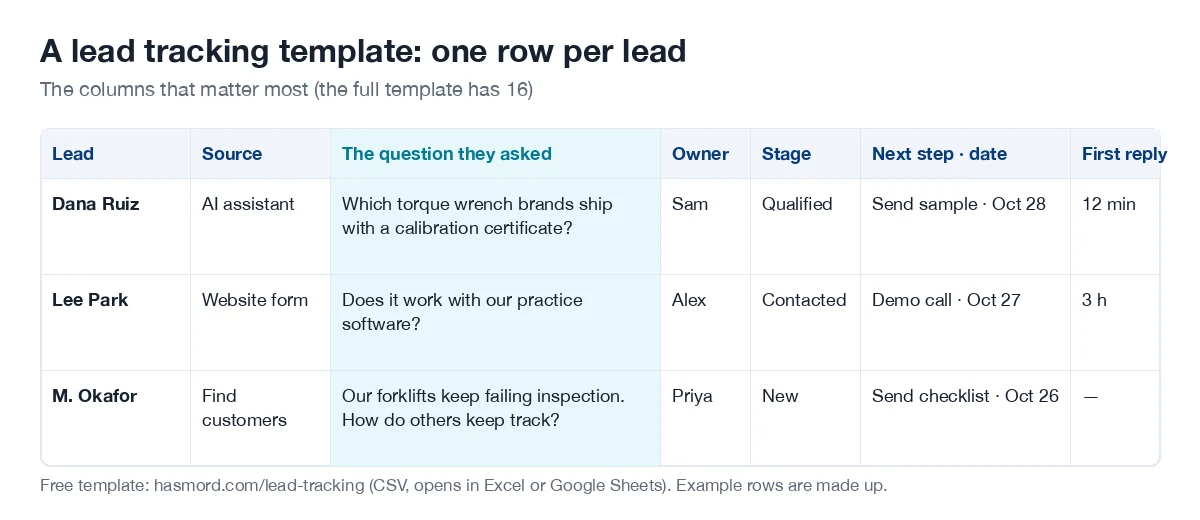
Download the lead tracking template (CSV)
It opens in Excel and Google Sheets. The three example rows are made up; delete them and start.
The 5-minute rule says to contact a new inbound lead within five minutes. It comes from research on lead response by James Oldroyd. In a widely quoted 2011 Harvard Business Review study (Oldroyd, McElheran and Elkington), companies that contacted a lead within an hour were nearly seven times as likely to qualify it as those that waited an hour longer, and more than 60 times as likely as those that waited a day or more.
The same study audited 2,241 US companies: 37% replied within an hour, and 23% never replied at all. The data is old, but the logic still applies: the reply that comes first usually wins the conversation. That is why the template has a column for minutes to first reply. Sort by it every week.
More buyers ask ChatGPT, Gemini, Perplexity or Google’s AI Overviews before they contact anyone. Those leads are hard to see in analytics:
So ask. Add two fields to your contact form or first call: “What did you ask, and where?” Record the answer in the question column and set the source to “AI assistant” when they name one. After a few months you will know which questions bring buyers through AI answers, and you can check what those answers say about you. If an answer gets your price or your stock wrong, that is the next thing to fix.
A spreadsheet is enough while one or two people handle a few dozen leads a month. Use the template above and keep it in one shared file.
Move to a CRM when several people talk to the same leads, when you need to know who emailed whom without asking, or when duplicates start to slip in. Look for a CRM that keeps each lead’s question with it, checks for duplicates when a lead comes in rather than afterwards, records one owner per company, and puts every rep’s emails on the same timeline.
Hasmord is the AEO-native sales platform. Buyers ask questions across AI assistants, search, and sales conversations. Hasmord uncovers where your answers about your products and services fall short, turns evidence into better answers, finds potential customers for you, and connects every lead to your sales process.
In Hasmord, lead tracking is where the four steps meet. AI answers shows what ChatGPT, Claude, Gemini, Perplexity and Google’s AI Overviews tell buyers about your products and services, and evidence turns into better answers your team approves. Find customers finds people already describing the problem you solve. The CRM keeps every lead with the question that brought it.
When a new lead’s company website is already on file, Hasmord shows the existing customer and who owns it before anything is created, and your team decides; nothing is merged on its own. Replies from each rep’s connected Gmail land on the lead they belong to. Then you learn from every deal: the questions behind won and lost leads tell you which answers to check next. See pricing.
Keeping a record of every potential customer from first contact until they buy or say no: where they came from, what they asked, who owns them, the next step and how it ended.
Put every lead in one place, record the source and the question they asked, check for duplicates when a lead comes in, give each company one owner, keep a next step with a date on every open lead, and review once a week.
Contact a new inbound lead within five minutes. In a widely quoted 2011 Harvard Business Review study, companies that replied within an hour were nearly seven times as likely to qualify a lead as those that waited an hour longer, and more than 60 times as likely as those that waited a day or more.
Yes, while one or two people handle a few dozen leads a month. Use one shared file with fixed columns for source, the question, owner, stage and next step. Move to a CRM when several people work the same leads or duplicates appear.
The lead and company, contact details, source, first touch date, the question they asked, where they asked it, owner, stage, next step and its date, last contact, minutes to first reply, and the outcome with the reason if lost.
Analytics shows only part of it: AI referrals appear only some of the time, and clicks from Google AI Overviews arrive as google.com. Ask new leads what they asked and where, record it, and set the source to AI assistant when they name one.
Related: cost per lead · buying signals · AI visibility to leads · AI-native CRM · the AEO-native CRM.