Work on your products from the AI assistant you already use: read what AI tells your buyers, put your own words into your product information, add products and prepare drafts. You approve and publish in Hasmord.
The short answer: Hasmord works as a remote MCP server. Add it to your AI assistant, sign in to Hasmord, and choose what the assistant may do, for which products and for how long. It can then read your results, save changes you give it in your own words, add products and work on drafts with you. Each change shows in History and can be undone, and wording Hasmord’s AI writes goes on only when someone on your team approves it in Hasmord.
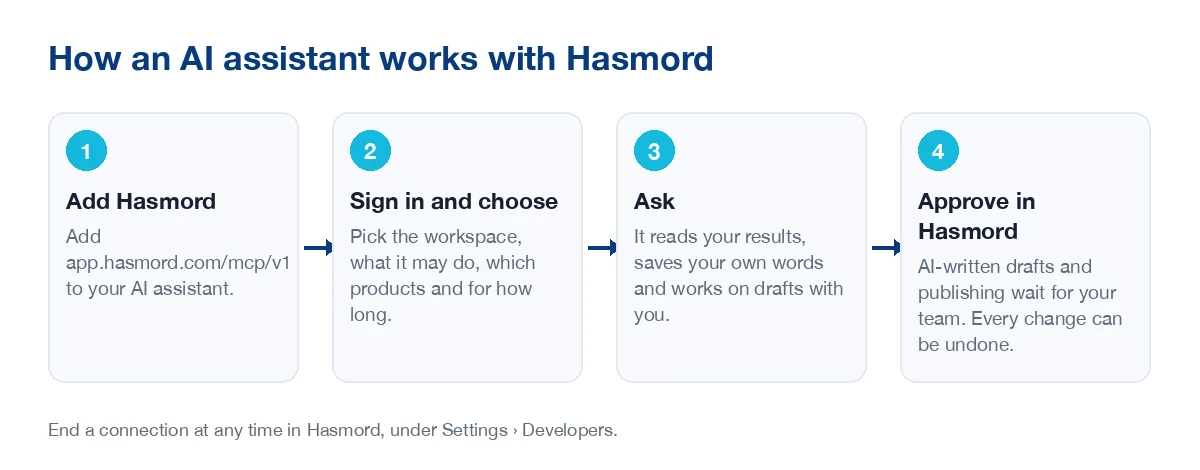
Your assistant reads, saves your own words and works on drafts; your team approves and publishes in Hasmord.
What your assistant can do
Read your results: product facts, the answers AI assistants gave to your buyer questions, improvements, evidence gaps, History and question monitors.
Change product information: save what you tell it in your own words, such as a fact, an FAQ, Best for and Not for, or a price, directly into the product; add a product by its page address or import up to 100; put back a change from History. It shows you the exact words and where they go before it saves them.
Work on drafts: prepare a draft from an improvement, edit or rewrite it to your instruction, or reject it, and draft FAQ or specifications for up to 50 products at once. Every draft waits for review.
Ask the AI engines: ask ChatGPT, Claude, Gemini and Perplexity a buyer question about a product, run a simulation, or watch one question on Google’s AI answer for a week.
Run competitor research: within the monthly limit you set for the connection.
Find customers: preview a search and the most it could charge, start it when you say so, and read the leads waiting for review.
Send inquiries to AI intake: AI intake prepares leads from them for your team to review.
Customer and contact records: with an API key an owner or admin creates, a tool can read, create and edit customers and contacts by id, as the person who created the key. It can’t list or delete them.
What stays with you
These stay with a person in Hasmord: approving a draft, publishing or unpublishing a page, the weekly research schedule, deleting a product, changing who has access, verifying a lead and adding it to your CRM, and topping up your balance or raising your limits. When your assistant reaches one of them, it gives you a link to do it in Hasmord.
You choose the workspace, what the connection may do, which products it covers (all, or up to 200 you pick) and how long it lasts: 30, 90 or 365 days.
A connection has the access of the person who connected it, as it stands at the time, and never more. If their role changes, the connection changes with it.
History shows which changes were made through a connection, and every change there can be undone.
Hasmord shows every app as not verified by Hasmord, so check the app’s name before you allow it. You can see each connection and when it was last used, and end it at any time, under Settings › Developers.
What you need
A Hasmord workspace on the Growth, Pro or Scale plan.
To be an owner or admin, or a manager or editor connecting your own assistant. Analysts and viewers can’t connect.
An AI assistant or agent that can add a remote MCP server and sign in with OAuth. Checked so far: Claude (as a custom connector on claude.ai, on the web and in the desktop app), Claude Code (over a remote connection and through Hasmord’s local bridge) and Gemini CLI. Other clients are not yet verified.
How to connect
In your assistant, add a custom connector or MCP server with the address https://app.hasmord.com/mcp/v1.
When your assistant opens Hasmord, sign in as yourself.
Choose the workspace, what the connection may do, which products it covers and how long it lasts, then allow it.
Ask your assistant, for example: “Use Hasmord to find my products and tell me what one of them still needs.”
For a tool that can’t sign in, an owner or admin can create a connection key in Settings › Developers instead. The connection guide has every permission, all 60 tools and the messages you may see.
Things to ask your assistant
“Which of my products has the weakest AI answers, and what is missing?”
“Our hiking boots are waterproof to 15 cm. Add that to the product facts.” Your assistant shows you the words and the field, saves them after your yes, and you can undo it in History.
“Prepare a draft from the top improvement for this product. Don’t publish anything.” You get a link to review it in Hasmord.
“Add these 30 product pages to Hasmord.”
“Preview a customer search for this product and tell me the most it could cost. Start it only when I say so.”
What it costs
Reading, History, undo and saving your own words are free. Drafts Hasmord’s AI writes are paid from your prepaid balance, the same one Find customers uses, on what the AI actually uses; the most a batch could cost is held first and the rest is released. Asking the AI engines and simulations use your plan’s allowances, research uses research credits within each connection’s monthly limit, and Find customers searches use your balance within your daily limit. With an empty balance, nothing is sent and nothing is charged, and topping up always happens in Hasmord, never through the assistant. See pricing.
Where this fits
Hasmord is the AEO-native, recursively self-improving sales platform. Buyers ask questions across AI assistants, search, and sales conversations. Hasmord uncovers where your answers about your products and services fall short, turns evidence into better answers, finds potential customers for you, and connects every lead to your sales process. Connecting your AI assistant lets you do that work from the assistant you already use, with the same rules as in Hasmord.
Can my AI assistant change my product information?
Yes, if you allow “Change product information”. Your own words go in directly, show in History and can be undone, and the assistant can add or import products and edit, rewrite or reject drafts. Wording Hasmord’s AI writes changes your product information only when someone on your team approves it in Hasmord.
Which AI assistants can connect to Hasmord?
Any assistant or agent that can add a remote MCP server and sign in with OAuth, or use a connection key. Checked so far: Claude (as a custom connector on claude.ai, on the web and in the desktop app), Claude Code (over a remote connection and through Hasmord’s local bridge) and Gemini CLI. Other clients are not yet verified.
Who in my team can connect an assistant?
Owners and admins can connect assistants, create connection keys and manage every connection. Managers and editors can connect their own assistant by signing in from it, and see and disconnect only their own. A connection has the access of the person who connected it, never more.
What does it cost?
Reading and saving your own words are free. Drafts Hasmord’s AI writes are paid from your prepaid balance, on what the AI actually uses. Research uses research credits, and Find customers searches use your balance within your daily limit, as in the app.
How do I disconnect an assistant?
In Hasmord, open Settings › Developers and end the connection. It also ends when it expires (30, 90 or 365 days, as you chose) or when the person who connected it loses access.