
Connection guide
Everything an AI assistant or agent needs to work with a Hasmord workspace: the address, sign-in, permissions, all 60 tools, the confirmations a person gives, costs and what each message means.
New to this? Start with what an AI assistant can do with Hasmord.
| Item | Value |
|---|---|
| Server address | https://app.hasmord.com/mcp/v1 |
| Transport | Remote MCP server over Streamable HTTP |
| Sign-in | OAuth 2.1 with PKCE (S256), public clients only (token_endpoint_auth_method: none). Your assistant finds the sign-in from the server address. |
| Metadata | On https://app.hasmord.com:/.well-known/oauth-protected-resource/mcp/v1/.well-known/oauth-authorization-server |
| App identity | A client ID metadata document, or dynamic client registration. Hasmord shows every app as not verified by Hasmord. |
| Scopes | read, drafts, product_write, research, intake, leads_read, leads_run |
| Without sign-in | An owner or admin can create a connection key in Settings › Developers. |
| Plans | Growth, Pro and Scale |
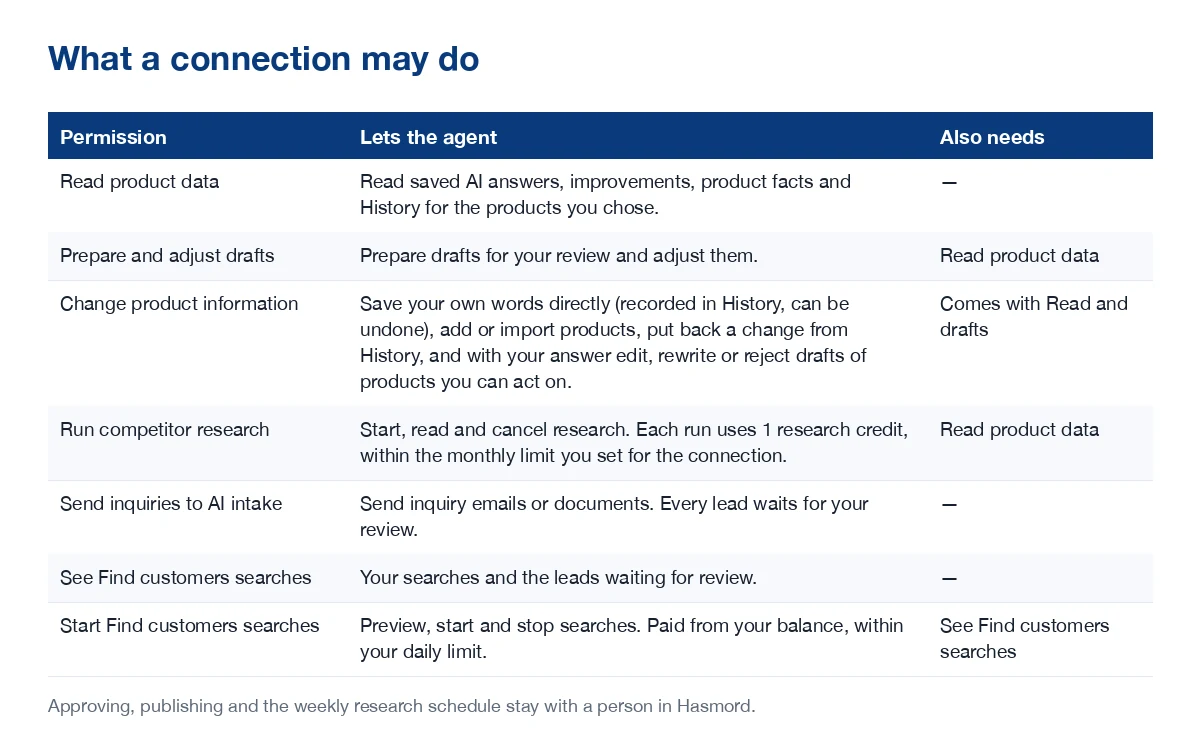
The person chooses these on the sign-in page or in Settings › Developers, along with the products (all they can access, including ones added later, or up to 200 they pick), how long the connection lasts (30, 90 or 365 days) and, for research, a monthly limit.
| Permission | Scope | Lets the agent | Also needs |
|---|---|---|---|
| Read product data | read | Read saved AI answers, improvements, product facts and History for the products you chose. | — |
| Prepare and adjust drafts | drafts | Prepare drafts for your review and adjust them. | Read product data |
| Change product information | product_write | Save your own words directly (recorded in History, can be undone), add or import products, put back a change from History, and with your answer edit, rewrite or reject drafts of products you can act on. | Comes with Read and drafts |
| Run competitor research | research | Start, read and cancel research. Each run uses 1 research credit, within the monthly limit you set for the connection. | Read product data |
| Send inquiries to AI intake | intake | Send inquiry emails or documents. Every lead waits for your review. | — |
| See Find customers searches | leads_read | Your searches and the leads waiting for review. | — |
| Start Find customers searches | leads_run | Preview, start and stop searches. Paid from your balance, within your daily limit. | See Find customers searches |
Records are not MCP tools. With an API key from Settings › Developers (owners and admins only) that has a records permission, a tool can read, create and edit customers and contacts by id through Hasmord’s API, as the member who created the key. It can’t list or delete records. The key also needs one of the permissions above.
| Permission | Lets the agent |
|---|---|
| Read records | Customer and contact records the member who connected it can read. |
| Create and edit records | Create and edit customer and contact records the member who connected it can edit. |
| Customer terms (commercial) | Adds customer terms to what the connection can read or write. |
| Contact address, consent and social (personal) | Adds contact address, consent and social fields to what the connection can read or write. |
Approving a draft, publishing or unpublishing a page, the weekly research schedule, deleting a product, changing who has access, verifying a lead and adding it to your CRM, and topping up your balance or raising your limits stay with a person in Hasmord. An agent that calls one of them gets person_only_action with a link where the person can do it.
Every tool takes an idempotency key: the same request with the same key gives the same result and never repeats a write or a charge.
“Needs” is the permission the connection must have. Every product tool also needs Read product data. Tools marked Change product information are refused without it.
| Tool | What it does | Needs |
|---|---|---|
hasmord_search_products | Find products in the workspace by name. | Read |
hasmord_read_product_content | Everything the product’s Information and product pages hold, each value with its state, source and an id. | Read |
hasmord_read_product_facts | The product’s stated facts only. | Read |
hasmord_read_product_history | Who changed what and when, and whether it can be put back. Changes made through a connection name the connection. | Read |
hasmord_read_product_worklist | What the product still needs, in the app’s order. | Read |
hasmord_read_aeo_report | The product’s report. | Read |
hasmord_read_ai_answers | The answers AI assistants gave to your buyer questions. | Read |
hasmord_read_improvements | The improvements to make, with the buyer question behind each. | Read |
hasmord_read_evidence_gaps | Facts that are missing, conflicting or unconfirmed. | Read |
hasmord_read_evidence | The sources saved for the product. | Read |
hasmord_read_asks | Recent questions asked of the AI engines, and their status. | Read |
hasmord_read_latest_simulation | The latest simulation result. | Read |
hasmord_read_question_monitors | Question monitors and their daily results. | Read |
hasmord_read_publish_preview | What the product’s pages would show if published. | Read |
hasmord_get_operation | The state of a longer task the connection started. | Read |
| Tool | What it does | Needs |
|---|---|---|
hasmord_submit_product_changes | Save the person’s own words into the product: directly with Change product information (in History, can be undone); otherwise, and for wording the agent wrote, as a draft for review where a draft kind exists. | Drafts |
hasmord_undo_product_change | Put back one change from the product’s History. | Change product information |
hasmord_add_product | Add a product by its page address. | Change product information |
hasmord_import_products | Add up to 100 products at once. The plan’s product limit applies. | Change product information |
hasmord_get_product_import | The state of an import. | Read |
hasmord_recheck_page | Read the product’s page again: preview first, then run after the person says yes. | Change product information |
hasmord_save_evidence | Save a source the person gave, in their own words. | Change product information |
hasmord_delete_evidence | Remove a source, on the person’s yes. | Change product information |
hasmord_improvement_action | Check an improvement against the current information, or set a question aside or back. | Drafts |
hasmord_dismiss_ask_improvement | Set an ask’s improvement card aside, or bring it back. | Drafts |
hasmord_dismiss_price_alert | Set a price alert aside as not an issue, on the person’s yes. | Change product information |
| Tool | What it does | Needs |
|---|---|---|
hasmord_prepare_draft | Prepare a new draft for review. | Drafts |
hasmord_prepare_improvement | Prepare a draft from a saved improvement, keeping its buyer question. | Drafts |
hasmord_adjust_draft | Adjust a draft waiting for review. | Drafts |
hasmord_edit_draft | Replace a waiting draft’s words with the person’s. | Drafts: its own untouched drafts; any draft with Change product information and the person’s answer |
hasmord_write_draft | Rewrite a waiting draft with AI. | Drafts: its own untouched drafts; any draft with Change product information and the person’s answer |
hasmord_prepare_draft_again | Replace an open draft with a new one made from the product as it is now. | Drafts: its own untouched drafts; any draft with Change product information and the person’s answer |
hasmord_review_draft | Reject a draft, or revise it to the person’s instruction. Approving stays with the person in Hasmord: the agent gets the draft’s link. | Drafts: its own untouched drafts; any draft with Change product information and the person’s answer |
hasmord_get_draft | Read a draft and its Review address. | Read |
| Tool | What it does | Needs |
|---|---|---|
hasmord_batch_prepare_content | Draft FAQ, Best for, Not for, Pros, Cons or specifications for up to 50 products and 500 items, in the background. Nothing is applied; every draft waits for review. | Drafts |
hasmord_get_content_batch | A batch’s status, counts, cost so far and items. | Read |
hasmord_retry_content_batch_items | Write a batch’s failed items again. | Drafts |
hasmord_cancel_content_batch | Stop a batch; drafts already made are kept. | Drafts |
hasmord_get_review_bundle | The drafts a batch left, with their Review addresses. | Read |
| Tool | What it does | Needs |
|---|---|---|
hasmord_ask_ai_engines | Ask the four AI engines one buyer question about a product, through the app’s own Ask. | Change product information |
hasmord_run_simulator | Start a simulation run with up to 15 buyer questions. | Change product information |
hasmord_start_question_monitor | Watch one buyer question on Google’s AI answer daily for 7 days: a quote first, then start on the person’s yes (1 research credit). | Research |
| Tool | What it does | Needs |
|---|---|---|
hasmord_start_research | Start a research run (research credits, within the connection’s monthly limit). | Research |
hasmord_get_research | Read a run and its results. | Read |
hasmord_cancel_research | Cancel a run. | Research |
hasmord_prepare_research_result | Prepare a draft or contact material from saved research, for review. | Research |
hasmord_set_research_schedule | The weekly research schedule. The person sets it in Hasmord; a connection gets a link. | Person only |
| Tool | What it does | Needs |
|---|---|---|
hasmord_publish_page | Publish the product’s page. The person does it in Hasmord; a connection gets a link. | Person only |
hasmord_unpublish_page | Take a page down. The person does it in Hasmord; a connection gets a link. | Person only |
| Tool | What it does | Needs |
|---|---|---|
hasmord_leads_sources | What the connection may search for. | See searches |
hasmord_leads_preview_run | What a search would do and the most it could charge. Nothing is charged. | Start searches |
hasmord_leads_start_run | Start a search after the person confirms. Paid from the balance within the daily limit. | Start searches |
hasmord_leads_get_run | A search’s progress. | See searches |
hasmord_leads_cancel_run | Stop a search the connection started. | Start searches |
hasmord_leads_list_drafts | Leads waiting for a person to check them. | See searches |
hasmord_leads_get_draft | One lead and why it fits. | See searches |
| Tool | What it does | Needs |
|---|---|---|
hasmord_intake_submit | Send one inquiry email or document; AI intake prepares a lead for review. | Intake |
hasmord_intake_submit_batch | Send up to 100 inquiries at once. | Intake |
hasmord_intake_append_source | Add a further source to a lead. | Intake |
hasmord_intake_get_status | What each inquiry became. | Intake |
| You see | What it means | What to do |
|---|---|---|
plan_required | The workspace isn’t on Growth, Pro or Scale. | Upgrade in Hasmord. |
person_only_action | The step is the person’s: approving, publishing, unpublishing or the weekly research schedule. | Open the link in the answer and do it in Hasmord. |
pending_review | A draft was saved and waits for review. | Open its Review address in Hasmord. |
draft_exists | A person has already touched that draft. | Work on the draft named in the answer. |
insufficient_balance | The prepaid balance is too low. Nothing was queued or charged. | Top up in Hasmord with the link in the answer, then ask again; the same request is charged once. |
daily_limit_reached | Today’s spending limit is used. | Raise the limit in Hasmord, or wait until tomorrow. |
not_your_draft | Without Change product information, a connection works only on drafts it made that no person has touched. | Open the review link in the answer, or connect with Change product information. |
confirmation_required | Changing someone else’s draft needs the person’s answer. | Ask the person, then send their answer as confirmed_via. |
wording_not_in_cited_words | A direct save must be the person’s own words, and these weren’t. | Show the person the words and send theirs, or save the wording as a draft. |
asked_before | That question was already asked. Nothing new was started or charged. | Read the earlier ask. |
| A tool is refused for permission | The connection wasn’t given that permission, or the member can’t act on that product. | Edit the connection in Settings › Developers, or connect again. |
| Every request is refused | The connection ended or expired, or the member who connected it lost access. | Connect again from your assistant. |
| Too many requests | A safety rate limit was reached. | Try again in a moment. |
In Hasmord, open Settings › Developers and end the connection. The agent then can’t read or do anything more. A connection also ends when it expires, or when the member who connected it loses access. Never paste an access token or connection key into a chat.
Email support@hasmord.com; we reply within 2 business days. Don’t send tokens, keys or customer text. What a connection may read is described in our Privacy Policy, and what you agree to in our Terms.
https://app.hasmord.com/mcp/v1. Your assistant finds the sign-in from this address; you sign in to Hasmord as yourself.
With OAuth 2.1 and PKCE (S256), as a public client. You sign in to Hasmord in your browser and choose the workspace, the permissions, the products and how long the connection lasts. A tool that can’t sign in can use a connection key that an owner or admin creates.
No. Approving a draft, publishing or unpublishing a page and the weekly research schedule stay with a person in Hasmord; the agent gets a link to do it there. With “Change product information”, it can save the person’s own words directly, and each change shows in History and can be undone.
60, listed in this guide with the permission each one needs. A tool the connection has no permission for is refused.