
Product pages
How to write an Amazon product description that follows Amazon’s rules, what HTML you can use (one tag), an example you can copy, and what ChatGPT, Perplexity and Google’s AI Overviews did with Amazon pages in 1,030 shopping answers.
Last updated November 18, 2026 · ~8 min read
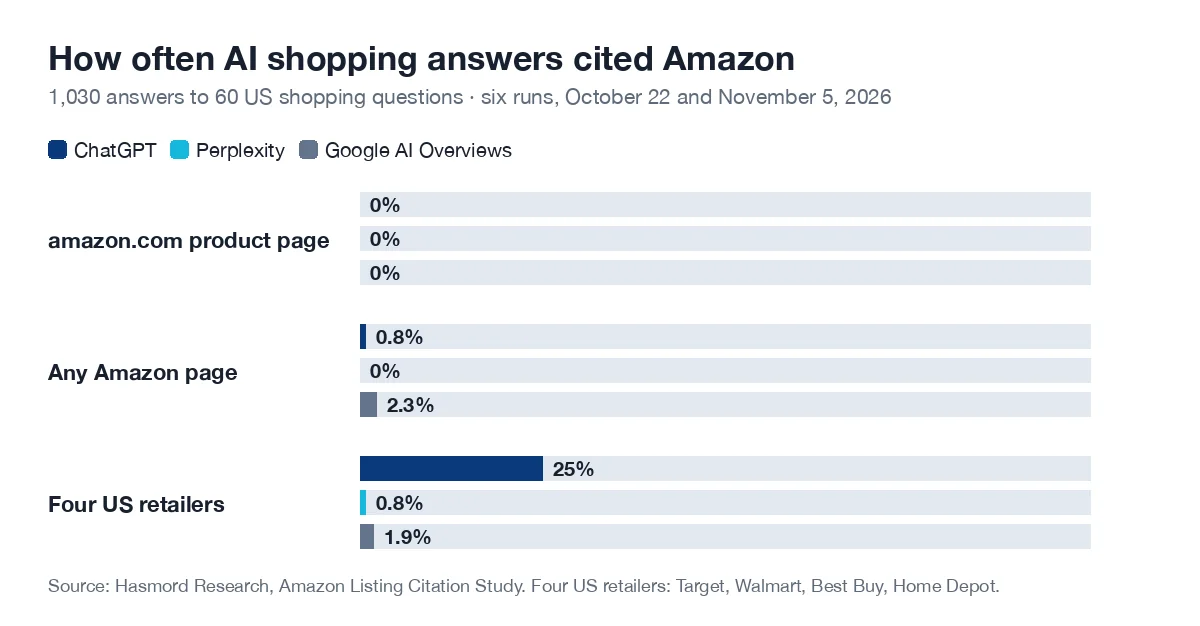
The short answer: An Amazon product description is the part of a product detail page where you describe the product in sentences, below the title, images and up to five bullet points. Amazon’s rules allow no HTML in it except line breaks, and no prices, contact details, links, reviews or promotions. When we searched on November 18, 2026, two Google AI Overviews gave opposite answers on the HTML question; Amazon’s own rules page settles it. Outside Amazon, AI assistants rarely see the listing: in 1,030 answers to 60 US shopping questions, ChatGPT, Perplexity and Google’s AI Overviews cited an amazon.com product page none of the time.
Cite this: Hasmord Research, Amazon Listing Citation Study (November 2026), https://www.hasmord.com/amazon-product-description. More numbers from our studies: AI search statistics.
Every product on Amazon has one product detail page, and the description is one part of it. Amazon’s own seller guide calls it a broad overview of your product and its benefits. It sits below the title, the images and up to five bullet points, so the shoppers who reach it have already scrolled past the summary and want more.
Three readers use it. Shoppers deciding between two similar products. Amazon’s search, since Amazon tells sellers that the words shoppers search for can go in titles, bullet points and descriptions. And Amazon’s shopping assistant, Alexa for Shopping (called Rufus until May 2026), which Amazon said at launch answers from its product catalog, customer reviews, community Q&A and information from across the web.
The description is easy to confuse with the other text fields on the page. Each has its own job:
| Field | What it is for | Amazon’s limit (checked November 18, 2026) |
|---|---|---|
| Title | What the product is: brand, product, model, the one attribute that tells it apart | 75 characters including spaces for all product types except media, per Amazon’s product detail page rules |
| Item highlights | Descriptive features that don’t fit in the title | 125 characters |
| Bullet points | The details buyers compare, one per bullet | Up to five |
| Product description | Who it is for, how it is used, the facts that need a sentence rather than a bullet | Not stated on Amazon’s public help pages; seller guides give 2,000 characters. Check your category’s style guide in Seller Central |
| A+ Content | Images, comparison charts and brand story, for brands enrolled in Brand Registry | Built in Amazon’s A+ Content tool, not typed into the description field |
One thing to watch: Amazon’s seller blog still gives a 200-character title limit and recommends 60, while the rules page now says 75. Go by the rules page: it is Amazon’s listing policy.
These come from Amazon’s product detail page rules for the US store, which apply to titles, descriptions, bullet points and images alike. We read them on November 18, 2026.
| Not allowed | Example of what to leave out |
|---|---|
| HTML, JavaScript or other code (line breaks excepted) | <b>, <ul>, <h2>, <a href>, inline styles |
| Contact details and web addresses | Phone numbers, addresses, email addresses, website URLs |
| Availability, price or condition | “In stock now”, “only $29”, “brand new” |
| Other ways to order or ship | Links to other stores, “free shipping” |
| Reviews, quotes, testimonials, review requests | “Rated 5 stars by customers”, “please leave a review” |
| Advertising and promotional material | “Sale”, “limited offer” |
| Time-sensitive information | Dates of events, seminars or tours |
| All-capital text | A description written entirely in capitals |
| Restricted phrases and prohibited claims | “FSA/HSA eligible”, and the claims in Amazon’s separate prohibited product claims policy |
The same page asks for two things in the other direction: product information has to be accurate and must not mislead customers about the product’s qualities, and the detail page has to say what else the product needs to work. A tire inflator that needs a 12 V socket, or a filter sold separately, belongs in the description.
No, with one exception. Amazon’s rule reads: “Don’t use HTML, JavaScript, or other types of code in your product detail pages. As a special case, you can use line breaks </br> in the description.” Bold, italics, lists, headings and links are all out.
That is not what every answer says. On November 18, 2026, we searched Google for two versions of the question and read both AI Overviews:
| Google search | What the AI Overview said about HTML | Matches Amazon’s rule? |
|---|---|---|
| amazon product description | Line breaks “and select tags like <p>, <strong>, and <em> are allowed” | No: Amazon allows line breaks only |
| html for amazon product description | Only line breaks are officially permitted; bold, italics, lists, headers and links are not | Yes |
Same engine, same day, opposite answers, and the first listed Amazon’s own product detail page rules among its sources. Both overviews also gave a 2,000-character limit, which we could not find on any public Amazon page. Several of the top results for the HTML search were HTML editors and tag lists for Amazon descriptions. When the answer is a rule, check the rule itself; how to do that quickly is in AI fact checking.
So how do you give a description some structure without HTML?
</br>, twice between paragraphs for a blank line.Here is a description for a made-up product, the same 40 oz tumbler as in our spec sheet example. First as you would type it into Seller Central, with line breaks as the only code:
For commuters, gym-goers and anyone who drinks from one bottle all day: a 40 oz tumbler that keeps water cold from morning to evening.</br></br>It keeps drinks cold for 10 hours and ice for 36 hours with the lid closed at a room temperature of 68 °F (20 °C), and keeps hot drinks hot for 6 hours. The body is double-wall 18/8 stainless steel; the lid and straw are BPA-free, and every part is dishwasher safe.</br></br>The base fits most car cup holders up to 3.9 in (10 cm) wide. Empty, with lid and straw, it weighs 1.4 lb (0.64 kg) and stands 12.4 in (31.5 cm) tall with the straw in.</br></br>In the box: one tumbler, one lid and one straw. Covered by a 5-year warranty against manufacturing defects.
What shoppers see:
For commuters, gym-goers and anyone who drinks from one bottle all day: a 40 oz tumbler that keeps water cold from morning to evening.
It keeps drinks cold for 10 hours and ice for 36 hours with the lid closed at a room temperature of 68 °F (20 °C), and keeps hot drinks hot for 6 hours. The body is double-wall 18/8 stainless steel; the lid and straw are BPA-free, and every part is dishwasher safe.
The base fits most car cup holders up to 3.9 in (10 cm) wide. Empty, with lid and straw, it weighs 1.4 lb (0.64 kg) and stands 12.4 in (31.5 cm) tall with the straw in.
In the box: one tumbler, one lid and one straw. Covered by a 5-year warranty against manufacturing defects.
About 700 characters, line breaks included. No price, no “best”, no review quote, and every number has a unit and a condition a shopper could check.
Inside Amazon, yes: the description is part of the catalog Amazon’s own assistant answers from. Outside Amazon, buyers ask ChatGPT, Perplexity and Google, and we wanted to know whether those answers ever lean on an Amazon listing. We went back to the 1,030 answers from our shopping studies: 60 US shopping questions (“best X for Y”, “X vs Y”, “is X worth it”, “how to choose”), asked three times on October 22 and three times on November 5, 2026, and counted every page each answer cited.
| Engine | Answers | Cited an amazon.com product page | Cited any Amazon page | Cited Target, Walmart, Best Buy or Home Depot |
|---|---|---|---|---|
| ChatGPT | 360 | 0 | 3 (search results pages) | 91 (25%) |
| Perplexity | 360 | 0 | 0 | 3 |
| Google AI Overviews | 310 | 0 | 7 (search results, best-seller lists, a product page on Amazon’s UAE store) | 6 |
| All three | 1,030 | 0 | 10 (1%) | 100 (10%) |
Not one of 1,030 answers cited a product page on amazon.com, the page your description lives on. ChatGPT cited Target, Walmart, Best Buy or Home Depot in a quarter of its answers, and an Amazon page in three, each a search results page. ChatGPT’s product cards from the October 22 runs looked the same: only 1 of 297 store links went to Amazon, as our ChatGPT product card study found.
One likely reason is in Amazon’s robots.txt. When we read it on November 18, 2026, it closed the whole site to 99 named crawlers, among them OpenAI’s GPTBot, OAI-SearchBot and ChatGPT-User, Perplexity’s PerplexityBot and Perplexity-User, Anthropic’s ClaudeBot, Claude-SearchBot and Claude-User, Google-Extended and GoogleAgent-Shopping. Googlebot is not among them, so Amazon listings still show in Google Search; Google’s AI Overviews in our sample still cited none. What each of these crawlers does is explained in our GPTBot guide.
So where do the answers get product facts? Often from the brand itself. In our AI assistant shopping sources study, a brand’s own site was cited in 57% of ChatGPT shopping answers with sources, 53% of Perplexity’s and 49% of Google’s AI Overviews. How Perplexity puts its shopping answers together is in Perplexity shopping, and why Amazon wants shoppers to research inside Amazon instead is in Amazon’s World Product Graph.
What that means for you: write the Amazon description for Amazon’s shoppers, search and assistant, and put the same facts, in the same numbers, on your own product page. That page is the one the assistants outside Amazon can read.
Four short paragraphs, separated by line breaks. Skip a line that doesn’t apply.
| Paragraph | What to write |
|---|---|
| 1. Who it is for | The buyer and the job, in one or two sentences, using the words they search for |
| 2. What it does | The two to four facts buyers compare, each with unit and condition, and what it is made of |
| 3. Fit and use | Size, weight, what it works with, what else it needs, how to clean or maintain it |
| 4. In the box | Everything that ships, and the warranty |
Rules: Amazon’s product detail page rules for the US store and its seller blog post on product listings, read on November 18, 2026; rules change, and categories have their own style guides. AI Overviews: two Google searches (US, English, desktop) on November 18, 2026, one result each. Citations: no new questions were asked; we re-read the 1,030 answers collected for our shopping studies: 60 US shopping questions asked three times on October 22 and three times on November 5, 2026, in ChatGPT (chatgpt.com search, not signed in), Perplexity (Sonar API) and Google’s AI Overviews (counted when Google showed one). A cited page is a source ChatGPT listed, a Perplexity citation or an AI Overview reference; Google’s own product cards inside an AI Overview are not counted. Any page on an Amazon domain counts as an Amazon page; a product page is an Amazon detail page. Robots.txt: amazon.com/robots.txt fetched on November 18, 2026. One market, English only, and questions we chose, so read the numbers as directions, not rates. All our numbers are on AI search statistics.
Hasmord is the AEO-native sales platform. Buyers ask questions across AI assistants, search, and sales conversations. Hasmord uncovers where your answers about your products and services fall short, turns evidence into better answers, finds potential customers for you, and connects every lead to your sales process.
Your Amazon listing and your own product page should tell the same story. Hasmord’s first step, which uncovers where your answers about your products and services fall short, starts from your buyers’ questions: AI answers asks them in ChatGPT, Claude, Gemini and Perplexity and keeps every answer and its sources, so you can see which page an answer took its facts from, yours, a retailer’s or a reviewer’s, and whether the facts match what you sell.
The second step turns evidence into better answers: Hasmord compares those answers with your product facts and prepares fixes, product by product, for your team to approve. Find customers then finds potential customers already looking for what you sell, with the reason each one fits; only the people you verify join your CRM, and Hasmord never contacts anyone for you. In the CRM, each lead keeps the question that brought it. See pricing.
The section of an Amazon product detail page where the seller describes the product in sentences: who it is for, how it is used and the facts that need more than a bullet point. It sits below the title, images and up to five bullet points. Shoppers, Amazon’s search and Amazon’s shopping assistant all read it.
No. Amazon’s product detail page rules say not to use HTML, JavaScript or other code, with one exception: line breaks (</br>) in the description. Bold, italics, lists, headings and links are not allowed. Put lists in the bullet points, and use A+ Content for visual layout if your brand is in Brand Registry.
Seller guides commonly give 2,000 characters, but we could not find the figure on a public Amazon help page, so check your category’s style guide in Seller Central. Length matters less than content: a few short paragraphs that answer the questions shoppers ask are enough.
Under Amazon’s product detail page rules: HTML or other code (except line breaks), phone numbers, addresses, email addresses and URLs, price, availability or condition, other ways to order or ship such as free shipping, reviews, quotes, testimonials and review requests, advertising, time-sensitive information, all-capital text, and prohibited product claims.
Bullet points (up to five) list the details buyers compare, one per bullet, and sit near the top of the page. The description comes further down and uses sentences to say who the product suits, how it is used and what else it needs. Don’t repeat the bullets word for word.
Rarely, if at all. Hasmord Research’s Amazon Listing Citation Study (November 2026) found that in 1,030 answers to 60 US shopping questions, ChatGPT, Perplexity and Google’s AI Overviews cited an amazon.com product page none of the time. Amazon’s robots.txt blocks OpenAI’s, Perplexity’s and Anthropic’s crawlers, so put the same facts on your own product page too.
Related: how to write product descriptions · product spec sheet · AEO for Amazon sellers · appear in Amazon Rufus · AI assistant shopping sources study · GPTBot.